Chat overview
For everyone. Channels, direct messages, group chats, and threads.
Last updated About 2 months ago
For everyone.
Chat is where the team talks. The left of the Chat section lists channels, direct messages, and group chats. The rest of the screen is the conversation you have open.
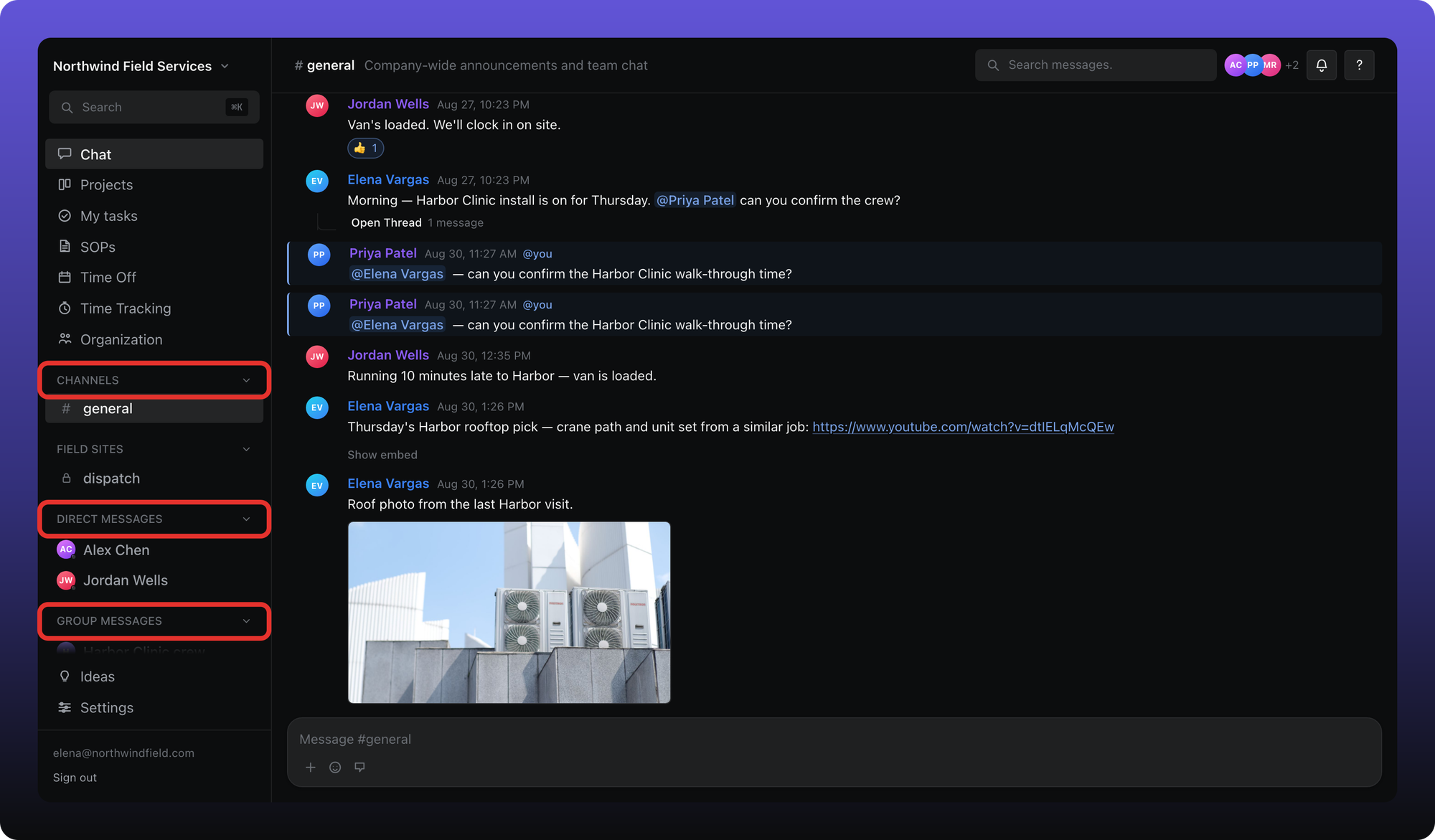
Channels. Public channels show a #. Private channels show a lock. They can sit under a category — here, Channels and Field sites.
Direct messages. One-to-one conversations.
Group messages. Conversations with more than two people.
A bold name and a count pill mean unread activity. Click a row to open it. The top bar shows the channel or conversation name, Search messages, and the members button.
How #general appears
If a workspace has no channels yet, the first manager or admin who opens Chat creates #general automatically. Members do not trigger that.
Related
Sending messages, mentions, and files is in the next article. Threads, direct messages, and creating channels each have their own article in this collection.
Was this helpful?
Still need help? Ask the team